SD5913 · 8 OCTOBER 2026
Images & video
Pixels, models and interaction.
8 October 2026 · week05 content in the repository
The 1 October holiday moved this session one Thursday later.
01
SD5913 · 8 OCTOBER 2026
Images & video
Pixels, models and interaction.
8 October 2026 · week05 content in the repository
The 1 October holiday moved this session one Thursday later.
01
DATES TO KEEP · OCTOBER / NOVEMBER
22 October quiz · 1 November Assignment 3
Thursday 22 October: mid-term quiz in class.
Sunday 1 November, 23:59 (Hong Kong time): Assignment 3 is due.
Today we start thinking about the interactive experience. What might someone do with yours?
02
BEFORE · 13 MAY 2025
DHH wanted to keep the keyboard
“AI is a superb pair programmer, but I'd retire before permanently handing it the keyboard to drive the code.”
David Heinemeier Hansson, creator of Ruby on Rails. He already used AI to look up APIs and discuss ideas.
Should a developer understand every line of code they ship?
A Agree B Unsure C Disagree
03
CATCH-UP · SEPTEMBER 2026
Models improve. Agents get more tools.
22 SEP · ANTHROPIC
Claude Opus 5.5
Terminal-Bench 4.0 66.4% vs 52.3% for Opus 5.
About 40% lower cost on typical token-billed work.
29 SEP · OPENAI
GPT-6.1 Sol
OSWorld 2.0: +7 points vs GPT-6 Sol at maximum effort.
Less than half the cost per task at that setting.
29 SEP · OPENAI
dots
Always-on agent with a cloud computer and apps.
People set permissions and review consequential work.
Different tests and settings; vendor reports, not a head-to-head class test.
The two 29 September releases came after the keynote.
04
AFTER · 23 SEPTEMBER 2026 · RAILS WORLD
DHH now argues for agent-written code
DHH · Rails World 2026
Official keynote · Rust excerpt
He argues that coding agents change which languages and systems his team can build with.
Watch his Rust example. Which parts are evidence, and which are predictions?
Should a developer understand every line of code they ship?
A Agree B Unsure C Disagree
05
SD5913 · 8 OCTOBER 2026
Today
01
Recall values, types, lists and positions
02
Build a grid, then read it as pixels
03
Make an image from a rule or random numbers
04
Add time: video is an ordered sequence of frames
05
Compare learned image models and trace one generation path
06
Use an API or local model, then sketch one project interaction
06
00
Start with values
Build from Python you already know
07
00 · QUICK RECALL
A value has a type
An int counts: 3.
A float can measure: 3.5.
A str holds text: "blue".
A bool is a yes/no value: True or False.
A list keeps several values in order. The type tells Python how to interpret a value.
08
00 · ONE VALUE, THEN A LIST
Position gives an ordered value a place
A number can stand alone. A list gives several numbers an order.
Python counts list positions from zero.
Predict: what is at position two?
brightness = 160
row = [20, 80, 160, 240]
print(row[0]) # 20
print(row[2]) # 160
09
00 · FROM ROW TO GRID
A list of rows gives each value a position
Put rows inside an outer list and a value now has a row and a column.
The same brightness value can be drawn as a dark or light square.
Read it: gray[1][0] is row 1, column 0.
gray = [
[20, 80, 160],
[240, 160, 80],
]
print(gray[1][0]) # 240
10
00 · FROM GRID TO VISIBLE VALUES
A display maps each number to a shade.
11
00 · BROWSER PYTHON
A value becomes a shade
Open the HTML slides on your laptop. Press Run: the Python prints an SVG image.
The shades are reversed. Change one expression so 0 is black and 255 is white.
Predict which square changes before you run it again. No install needed.
12
00 · ONE PIXEL, THREE VALUES
A colour pixel groups its channels
One grayscale pixel stores one brightness value.
An RGB pixel stores three channel values: red, green and blue.
A grid of RGB pixels has row, column and channel positions.
gray_pixel = 160
rgb_pixel = [30, 90, 240]
# red, green, blue
13
00 · DATA → DISPLAY
Numbers describe the picture. A renderer makes them visible.
14
01
Pixels are values
A display turns an ordered set of numbers into a picture
15
01 · TWO WAYS TO SEE IT
A picture to us. A grid of values to a program.
16
01 · SPATIAL AXES + COLOUR CHANNELS
One position. Three channel values.
17
01 · A TINY IMAGE
A small list becomes visible pixels
Each row holds pixels; each pixel has red, green and blue values.
Run the complete script to enlarge a 2 x 2 image and save tiny-image.png.
In pfad/week05: uv run tiny_image.py
from PIL import Image
pixels = [
[(255, 0, 0), (0, 255, 0)],
[(0, 0, 255), (255, 255, 0)],
]
image = Image.new("RGB", (2, 2))
flat = [pixel for row in pixels
for pixel in row]
image.putdata(flat)
nearest = Image.Resampling.NEAREST
large = image.resize((120,120), nearest)
large.save("tiny-image.png")
print("saved tiny-image.png")
18
01 · SAVED OUTPUT
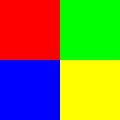
The four pixels after Pillow saves them
The top row is red, green; the bottom row is blue, yellow.
The script enlarges a 2 x 2 image without blurring its edges.
Try: change the green tuple to white and predict the new top-right pixel.
19
01 · READ ONE PIXEL
Position first, channels second
pixels[0][1] is the top row, second column: green.
pixels[1][0] is the bottom row, first column: blue.
The final three values describe one colour at that position.
Try: change one position, not the whole image.
pixels = [
[(255, 0, 0), (0, 255, 0)],
[(0, 0, 255), (255, 255, 0)],
]
print(len(pixels)) # 2 rows
print(len(pixels[0])) # 2 columns
print(len(pixels[0][0])) # 3 channels
pixels[0][1] = (255, 255, 255)
20
01 · HOW MUCH DATA?
Dimensions and representation matter
A 512 x 512 RGB image with one 8-bit value per channel contains 512 x 512 x 3 bytes.
That is 786,432 bytes (768 KiB) before file headers or compression.
Grayscale can use one value per pixel. RGBA adds an alpha channel for transparency. Floating-point models may use different value ranges and more bytes.
21
01 · NUMPY + PILLOW + OPENCV
Each library sees the same pixels differently
Array shape is (H, W, C); Pillow size is (W, H).
Pillow modes include RGB, L and RGBA. OpenCV transforms images/video; camera frames may be BGR.
import numpy as np
from PIL import Image
pixels = np.zeros((100, 100, 3), dtype=np.uint8)
pixels[:50, :50] = [255, 0, 0]
image = Image.fromarray(pixels)
gray = image.convert("L")
print(pixels.shape, pixels.dtype)
print(image.size, image.mode, gray.mode)
22
02
Make an image in code
Choose a rule, then inspect the marks it produces
23
02 · RANDOM PIXELS
Noise is a starting material
Each pixel gets three chosen values, from 0 through 255.
Try: change one dimension and predict what changes.
In pfad/week05: uv run noise.py
import random
from PIL import Image
rng = random.Random(7)
pixels = [(rng.randrange(256), rng.randrange(256), rng.randrange(256))
for _ in range(256 * 256)]
image = Image.new("RGB", (256, 256))
image.putdata(pixels)
image.save("noise.png")
print(image.size, image.mode)
24
02 · SAVED OUTPUT
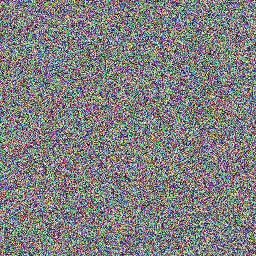
What does seeded noise look like?
Each position holds a separately sampled red, green and blue value.
This is the image produced with seed 7. Change the seed for a different pattern.
Try: change WIDTH and predict the output dimensions before running.
25
02 · FROM NOISE TO FORM
An image is a field we can transform
sample
Choose values
Random numbers, a formula, or measured data.
map
Apply a rule
Use position, neighbours, or time to change each value.
inspect
Judge the result
Look for a pattern and ask what the rule made visible.
26
02 · BROWSER PYTHON
Change the rule, change the image
This program draws 144 RGB pixels. Both colours currently follow the column.
Make blue depend on the row instead: top-right blue, bottom-left red.
Then try a diagonal or make the boundary move. The pixels are the output.
27
02 · FROM THE INTRODUCTIONS
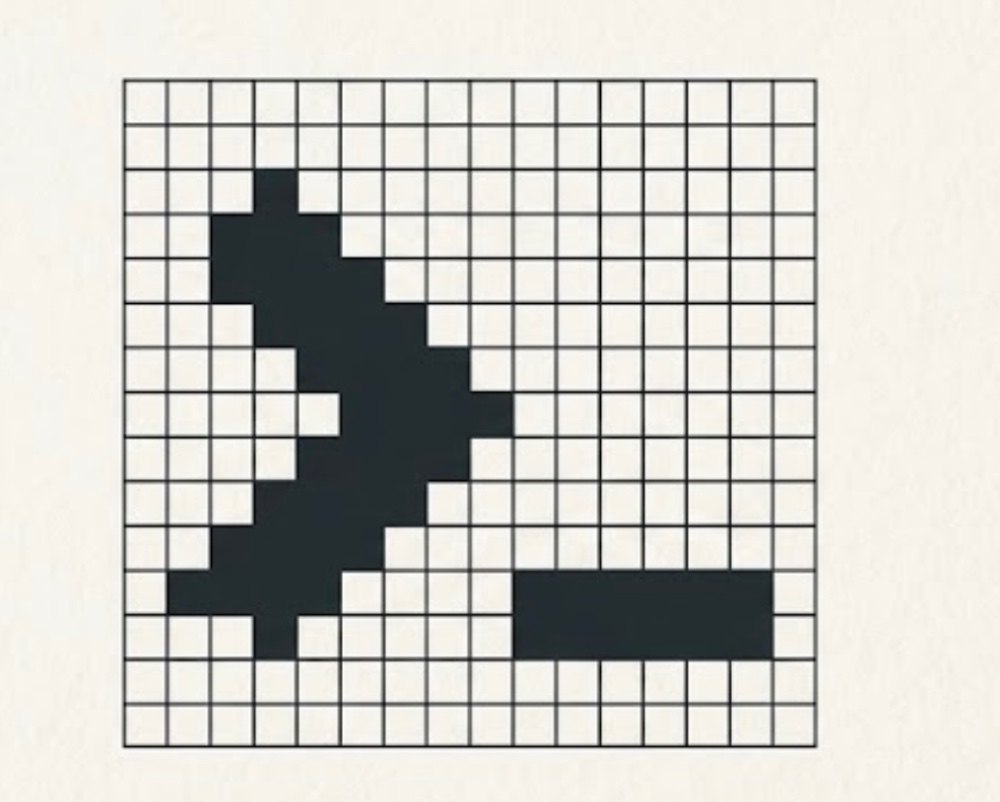
Two marks, two source images
These came from the student mark collection: a pixel yarn-ball and a stepped arrow with a separate underscore.
What survives when either image has fewer pixels, or becomes characters instead?
Source marks, not final A/B branding. The icon choice is still being refined.

28
02 · ASCII-MAGIC · ONE SOURCE
One mark, several text widths
from ascii_magic import AsciiArt
image = AsciiArt.from_image("out/source-crop.png")
chars = "@%#*+=-:. "
for n in range(12, 67, 6):
print(image.to_ascii(columns=n, char=chars,
width_ratio=1.5))
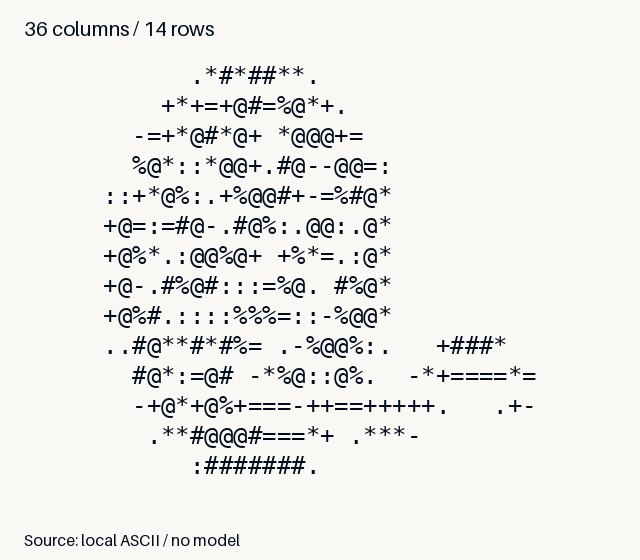
Full Python script · uv run logo_ascii.py
29
03
Add time
A video can be inspected as frames in an order
30
03 · THREE FRAMES
The same object, a different position
31
03 · IMAGE VS VIDEO
Time is another axis of change
One RGB image: height x width x channels.
A raw frame sequence: frames x height x width x channels.
Playback speed and frame order shape the motion we perceive.
A simple animation is a list of still images in order.
frame 0 -> time 0
frame 1 -> time 0.2 s
frame 2 -> time 0.4 s
same frames + new order = different motion
32
03 · MAKE THE FRAMES
Make one still image for each position
Each loop makes one complete still image.
The dot moves to a new position in each frame.
Keep the frames in a list, ready to save in order.
from PIL import Image, ImageDraw
frames = []
for x in (8, 26, 44):
frame = Image.new(
"RGB", (64, 48), "white")
draw = ImageDraw.Draw(frame)
draw.ellipse(
(x, 18, x + 12, 30),
fill=(232, 120, 53))
frames.append(frame)
33
03 · SAVE THE SEQUENCE
Save the frames as a looping GIF
Pillow saves the ordered frames as moving-dot.gif.
duration=200 means 200 milliseconds per frame.
In pfad/week05: uv run make_gif.py
frames[0].save(
"moving-dot.gif", save_all=True,
append_images=frames[1:],
duration=200, loop=0,
)
print("saved", len(frames), "frames")
34
03 · EDIT THE FRAMES
Change one position; watch the motion
let positions = [80, 280, 480];
function setup() {
  createCanvas(640, 360); frameRate(5);
  noStroke(); textSize(26);
}
function draw() {
  background('#FAF8F4');
  let i = (frameCount-1)%positions.length;
  fill('#ED6D24');
  circle(positions[i], 180, 90);
  fill('#000B1C');
  text('frame ' + i, 24, 40);
}
35
04
Learned image models
Different training ideas, different jobs
36
04 · THREE FAMILIES
GAN, VAE, diffusion
GAN
Generator + discriminator
A generator proposes images; a discriminator learns to distinguish generated from training examples.
VAE
Encoder + decoder
An encoder maps an image into a compact latent representation; a decoder reconstructs from it.
Diffusion
Learn to denoise
A model learns to reverse a noise process over many steps, guided by conditioning such as text.
37
04 · CLIP · IMAGE/TEXT ALIGNMENT
Compare representations; do not generate an image.
Code: week05_notebook.ipynb
38
04 · TWO USES OF TEXT
A similarity score is not a drawing instruction
CLIP: its text and image encoders compare a caption with an existing image.
Text-conditioned generation: a prompt becomes features that guide repeated changes to a noisy latent. The CLIP image encoder does not draw the image.
Which words name an object? Which constrain material, composition or what must be absent?
The particular text encoder and denoising architecture depend on the model.
39
04 · U-NET · TRAINING AND GENERATION
Learn to remove noise; then use that skill.
Code: week05_notebook.ipynb
40
04 · VAE · ENCODER AND DECODER
Learn a latent distribution; sample and reconstruct.
Code: week05_notebook.ipynb
41
04 · ONE LATENT-DIFFUSION PATH
From prompt and noise to pixels
Code: week05_notebook.ipynb
42
04 · READ THE MODEL SHAPES
What changes at each block?
narrow
VAE encoder
Compresses image pixels into a smaller latent representation.
repeat
U-Net denoiser
Predicts noise repeatedly while prompt features guide the steps.
widen
VAE decoder
Expands a cleaned latent back into visible image pixels.
43
04 · RUN IT IN PYTHON · SETUP
Give the local model its own environment
Diffusers connects the pipeline. PyTorch runs its tensor operations.
uv installs a compatible PyTorch build. An NVIDIA GPU still needs a working system driver.
Download libraries and weights before class. CPU works, but can be slow.
cd week05/diffusion
uv venv --no-project --python 3.12
uv pip install --torch-backend auto \
-r requirements.txt
uv run --no-project generate.py --check
uv run --no-project generate.py
44
04 · RUN IT IN PYTHON · LOAD
Load fixed weights onto a device
import torch
from diffusers import StableDiffusionPipeline
model = "stable-diffusion-v1-5/stable-diffusion-v1-5"
device = "cuda" if torch.cuda.is_available() else "cpu"
dtype = torch.float16 if device == "cuda" else torch.float32
pipe = StableDiffusionPipeline.from_pretrained(
model, dtype=dtype, use_safetensors=True,
variant="fp16" if device == "cuda" else None,
).to(device)
Excerpt: generate.py
45
04 · RUN IT IN PYTHON · GENERATE
Prompt + seed in; a Pillow image out
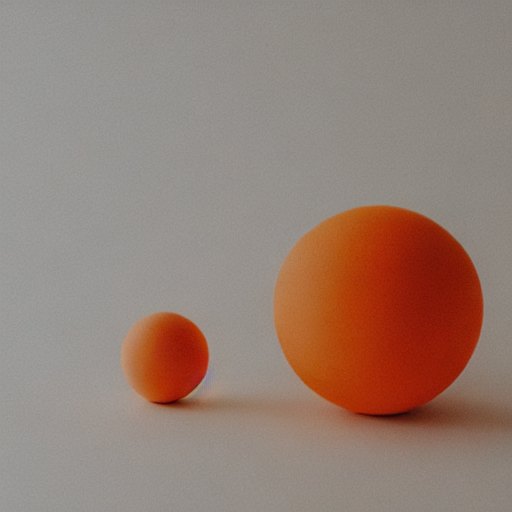
prompt = ("An orange ceramic sphere on cream paper, "
"studio photograph, soft shadow, centered composition")
generator = torch.Generator("cpu").manual_seed(7)
image = pipe(
prompt, num_inference_steps=20, guidance_scale=7.5,
width=512, height=512, generator=generator,
).images[0]
image.save("stable-diffusion-7.png")
Continue with the loaded pipe. Full runnable script
46
04 · RUN IT IN PYTHON · INSPECT
Check the image against the prompt
Requested: orange ceramic sphere, cream paper, soft shadow, centered composition.
Run: Stable Diffusion 1.5, seed 7, 20 steps, guidance 7.5, 512 x 512 pixels.
Which requirements are visible? Keep a copy, change only the seed, then compare.
Prepared output from the Python demo. Settings saved beside the image.
47
04 · MODEL BOUNDARY
One diagram, not every image model
This diagram explains one classic latent-diffusion path: text features condition a denoiser; a VAE decoder turns the final latent into pixels.
The training objective, denoiser and text encoder vary across model families. Some current systems use transformer denoisers or flow matching instead.
Ask of a service: which model made the image? Which controls does it expose? Which parts of our diagram are only assumptions?
48
04 · OPTIONAL CODE EXTRA · LCM
A compatible model can generate in fewer steps
The 2025 examples contrast Stable Diffusion at 20 inference steps with an LCM pipeline at 4 inference steps.
LCM uses a model and scheduler designed for few-step sampling; changing the step count alone is not the same thing.
Fewer steps can reduce wait time. Compare the image too: speed is not a quality guarantee.
49
04 · OPTIONAL CODE EXTRA · CONTROLNET
Use an edge map as a structural guide.
2025 code: 4_controlnet_canny.py
50
04 · WHERE DOES IT RUN?
A model has a size and a cost
download
Weights on disk
The 2025 notebook estimates 2–5 GB for its model files; check the selected model.
inference
Memory and compute
Its 4–6 GB VRAM estimate is for 512 x 512 Stable Diffusion, not a guarantee.
service
Remote API
A service hides local setup; the request, wait, response and access rules still matter.
51
04 · GENERATION SETTINGS
Every control changes the experiment
steps
Denoising updates
The archive compares different step counts; more steps can take longer.
guidance
Prompt influence
Guidance scale affects conditioning; its effect depends on the model.
seed
Starting randomness
A fixed seed can help repeat a run when the other settings also match.
resolution
Pixel dimensions
Larger outputs usually cost more memory and compute.
52
05
Generate and inspect
A prompt is an input; the image is a response
53
05 · BROWSER PYTHON
A prompt is part of the request
This prints request data. It does not send anything or need a key.
Add a material and a composition constraint to the prompt.
What would the model still have to decide on its own?
54
05 · THE API LOOP
The client asks; the service returns media
First, describe the image request as data.
The next two slides send it, then decode the returned image.
Preview without a key: uv run request_image.py
import base64, json, os
from urllib.request import Request
from urllib.request import urlopen
url = ("https://easel.ait4x.org"
"/v1/images/generations")
payload = {
"model": "qwen-image-2.1",
"prompt": ("An orange circle "
"on cream paper"),
"size": "1024x1024",
"n": 1,
"response_format": "b64_json",
}
55
05 · SEND AND WAIT
A key authorises the request
EASEL_KEY comes from the enabled classroom account.
Never paste the key into source code.
The client sends JSON and waits for a JSON response.
key = os.environ["EASEL_KEY"]
headers = {
"Authorization": "Bearer " + key,
"Content-Type": "application/json",
}
body = json.dumps(payload).encode()
request = Request(
url, data=body, headers=headers)
with urlopen(
request, timeout=600
) as response:
result = json.load(response)
56
05 · DECODE AND SAVE
The response contains an encoded image
Decode the base64 image bytes, then save them.
Only with an enabled account and key:
uv run request_image.py --send
The downloaded script saves out/api-image.png.
encoded = result["data"][0]["b64_json"]
image = base64.b64decode(encoded)
with open("api-image.png", "wb") as f:
f.write(image)
print("saved api-image.png")
57
05 · GUIDED API EXERCISE
Make a small comparison, not a masterpiece
01
State an invariant
Name material, composition and one thing the result must not contain.
02
Generate a first result
Use the classroom Easel client and note the model and settings shown.
03
Change one input
Revise one part of the request; keep the rest as stable as the client allows.
04
Judge the evidence
Did it meet your invariant? What did the model decide unprompted?
58
05 · IMAGE EDIT · ASCII → CRT
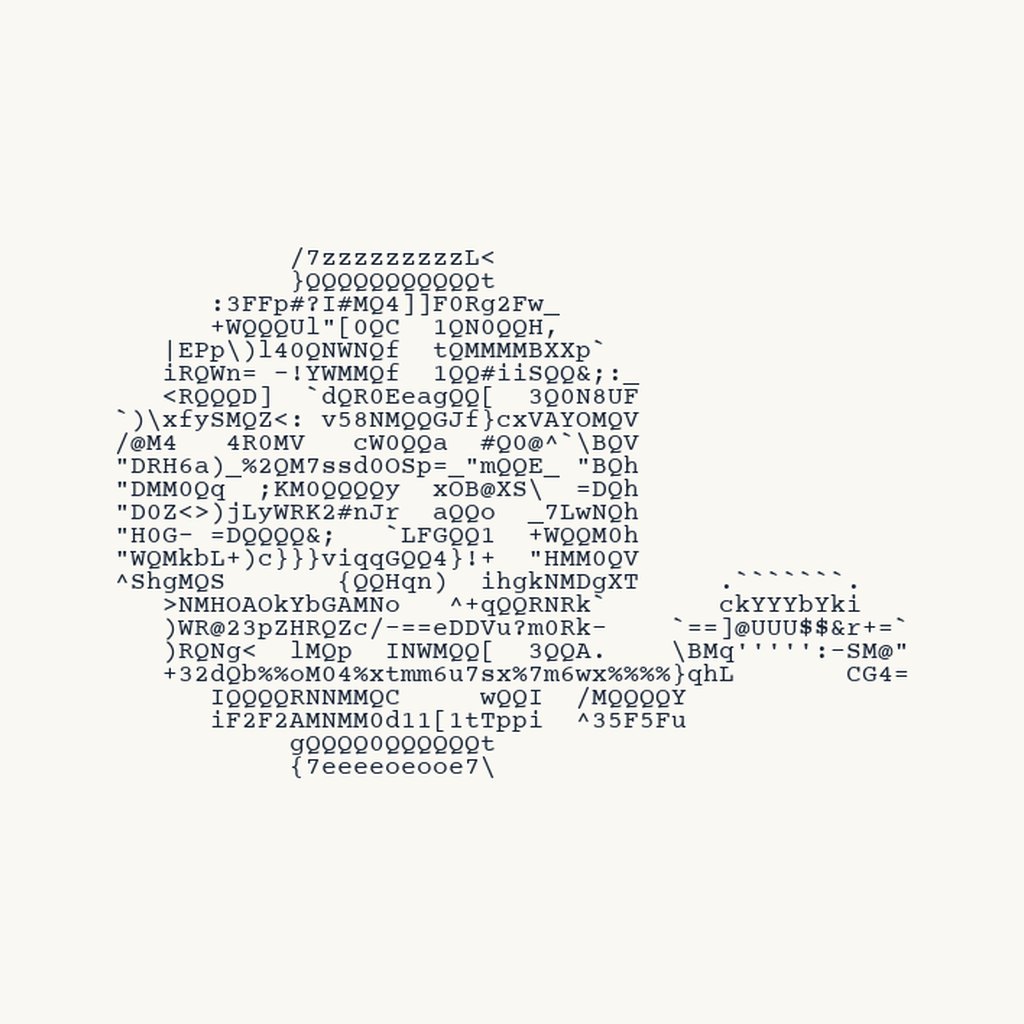
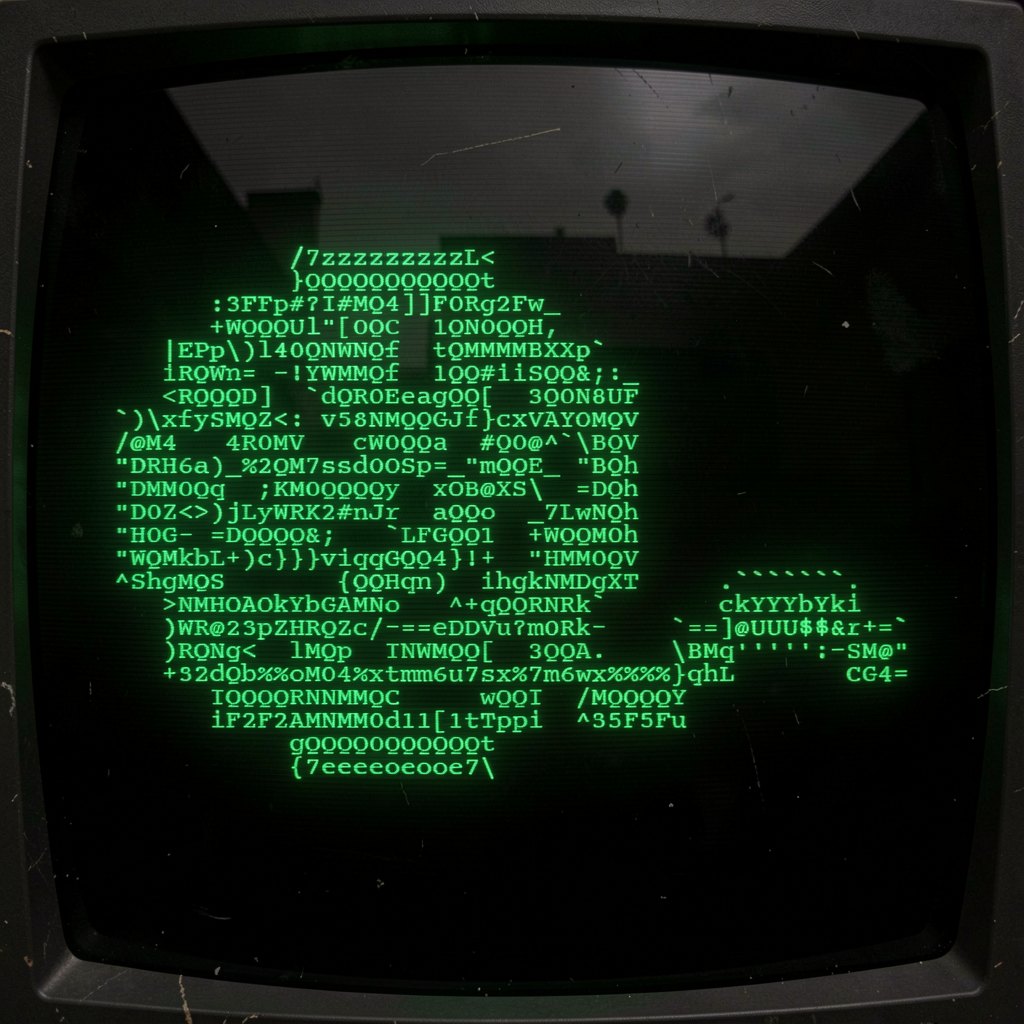
Keep the input; change the scene
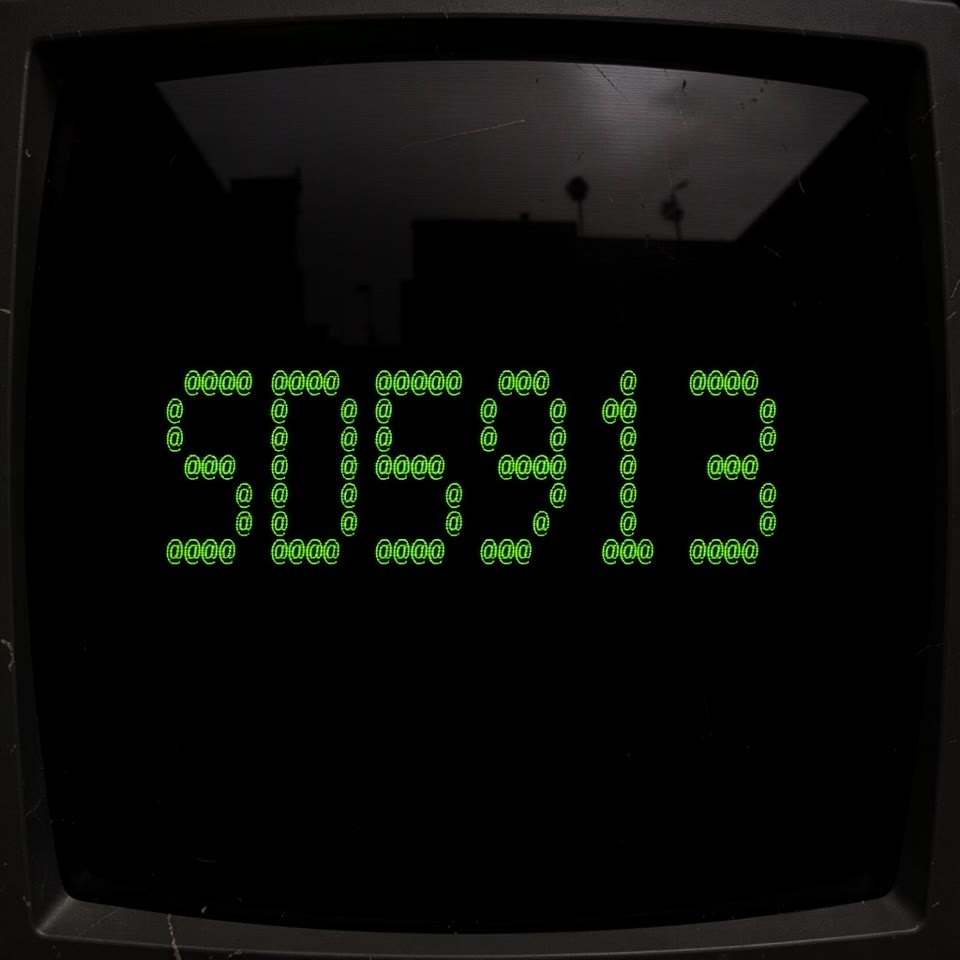
Left: the 56-column ASCII image from an earlier, denser conversion of the pixel yarn-ball. This PNG was the image-edit input.
Right: a draft image edit places an approximation of it on a CRT screen.
One image input + one editing instruction; not a text-only generation request.
59
05 · CRT VIDEO
Four edited stills, one coded transition
Watch the code resolve into SD5913, return to a full code field, and finally form a yarn mark.
The four keyframes were separately image-edited. Python renders the in-between movement; this is not an AI-generated video.
60
05 · CONTROL IMAGE · DIGITAL → WOOL
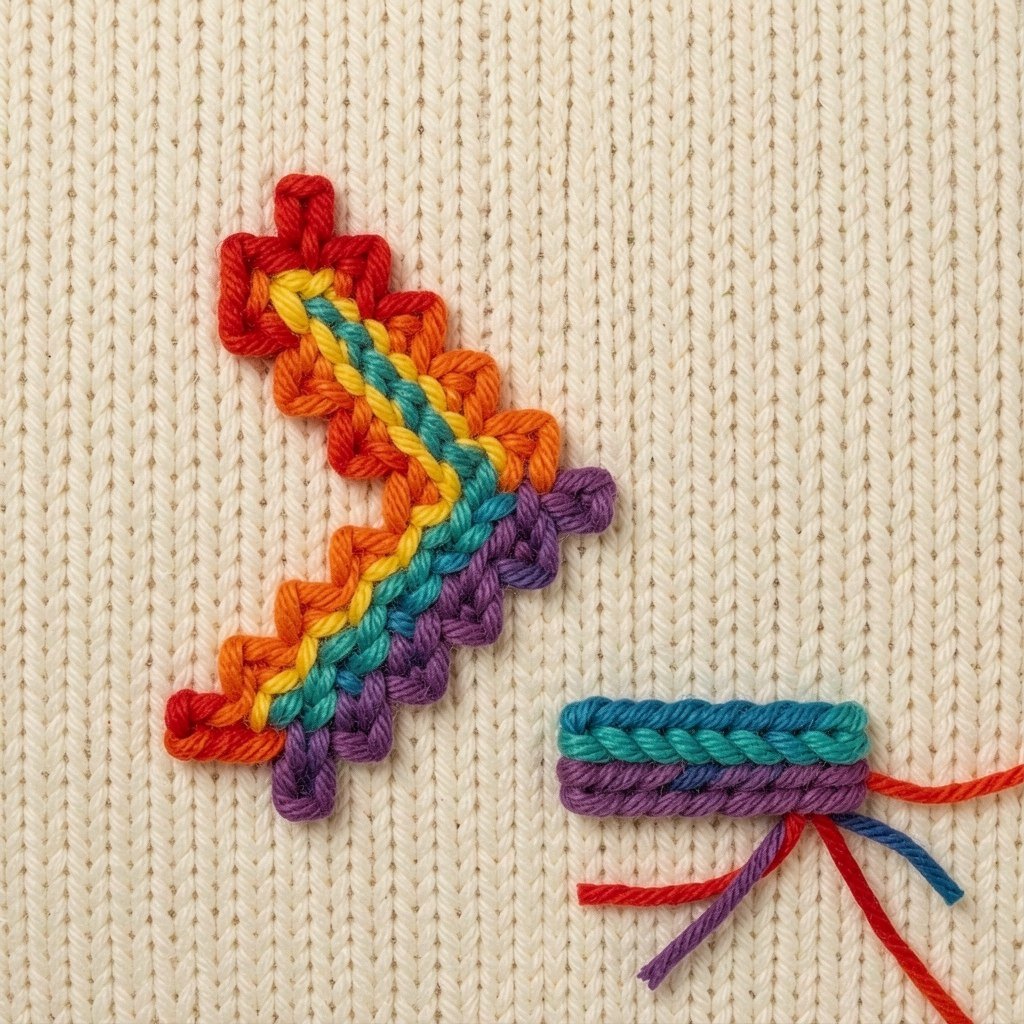
Use an image to guide the shape
Left: the control image supplies a stepped diagonal arrow and a separate underscore.
Right: the generated example renders those shapes as coloured yarn on knitted fabric.
The image guides structure; an instruction can change material and setting.
61
05 · DO THE GLYPHS STILL MATCH?
Generated text is not guaranteed text
Compare the actual 56-column ASCII input with the CRT edit. Are the characters the same, in the same places?
A prompt can ask for fidelity; it cannot guarantee spelling or exact alignment. If a wordmark must be exact, composite the real text layer after generation.
Record: input image, editing instruction, model/settings, result, and one thing you would keep or reject.
62
05 · OPTIONAL INSTRUCTOR DEMO
Local pipeline or API: compare the boundaries
Our Python demo runs Diffusers locally. The API sends a request to a service; both return image data.
Compare setup, wait time and the controls you can inspect. Which model and settings made each result?
Use the saved Python result if the local model is not ready. ComfyUI is another optional interface.
63
06
From image to interaction
Start with what someone can do
64
06 · TUTORIAL · MAKE AN ICON
Your image, your choice
Run the logo-to-ASCII script with your own image. Move the resolution slider and play the generated sequence; where does the mark become recognisable?
Export a square version and inspect it at avatar size. If you like it, set your GitHub profile picture yourself; this is optional, not a submission.
65
06 · PROJECT SEED
Name one meaningful interaction
Who is the person using your project, and what are they trying to do?
What action or input can they make? What does the program do next?
What feedback lets them understand the response? Which choice should stay in their control?
Bring one rough idea into a three-step storyboard: action -> system response -> feedback.
66
06 · OPEN QUESTION
What interaction do you want to make?
What could a visitor do: click, type, move, speak, or share an image?
What would change in response, and how would the visitor notice?
Sketch one action -> response -> feedback loop for your project. There is no single right answer.
67
Make the data visible. Make the response legible.
Images are values; video adds time; interaction gives someone a way in.
a·t4x
68
SD5913 · 8 OCTOBER 2026
Pixels, models and interaction.
8 October 2026 · week05 content in the repository
The 1 October holiday moved this session one Thursday later.
01
DATES TO KEEP · OCTOBER / NOVEMBER
Thursday 22 October: mid-term quiz in class.
Sunday 1 November, 23:59 (Hong Kong time): Assignment 3 is due.
Today we start thinking about the interactive experience. What might someone do with yours?
02
BEFORE · 13 MAY 2025
David Heinemeier Hansson, creator of Ruby on Rails. He already used AI to look up APIs and discuss ideas.
A Agree B Unsure C Disagree
03
ClassPoint · multiple choice — answer on the projector
CATCH-UP · SEPTEMBER 2026
22 SEP · ANTHROPIC
Claude Opus 5.5
Terminal-Bench 4.0 66.4% vs 52.3% for Opus 5.
About 40% lower cost on typical token-billed work.
29 SEP · OPENAI
GPT-6.1 Sol
OSWorld 2.0: +7 points vs GPT-6 Sol at maximum effort.
Less than half the cost per task at that setting.
29 SEP · OPENAI
dots
Always-on agent with a cloud computer and apps.
People set permissions and review consequential work.
Different tests and settings; vendor reports, not a head-to-head class test.
The two 29 September releases came after the keynote.
04
AFTER · 23 SEPTEMBER 2026 · RAILS WORLD
Official keynote · Rust excerpt
He argues that coding agents change which languages and systems his team can build with.
Watch his Rust example. Which parts are evidence, and which are predictions?
A Agree B Unsure C Disagree
05
ClassPoint · multiple choice — answer on the projector
SD5913 · 8 OCTOBER 2026
01 Recall values, types, lists and positions
02 Build a grid, then read it as pixels
03 Make an image from a rule or random numbers
04 Add time: video is an ordered sequence of frames
05 Compare learned image models and trace one generation path
06 Use an API or local model, then sketch one project interaction
06
00
BUILD FROM PYTHON YOU ALREADY KNOW
07
00 · QUICK RECALL
An int counts: 3.
A float can measure: 3.5.
A str holds text: "blue".
A bool is a yes/no value: True or False.
A list keeps several values in order. The type tells Python how to interpret a value.
08
00 · ONE VALUE, THEN A LIST
A number can stand alone. A list gives several numbers an order.
Python counts list positions from zero.
Predict: what is at position two?
brightness = 160
row = [20, 80, 160, 240]

print(row[0])  # 20
print(row[2])  # 160
09
00 · FROM ROW TO GRID
Put rows inside an outer list and a value now has a row and a column.
The same brightness value can be drawn as a dark or light square.
Read it: gray[1][0] is row 1, column 0.
gray = [
    [20, 80, 160],
    [240, 160, 80],
]

print(gray[1][0])  # 240
10
00 · FROM GRID TO VISIBLE VALUES
11
00 · BROWSER PYTHON
Open the HTML slides on your laptop. Press Run: the Python prints an SVG image.
The shades are reversed. Change one expression so 0 is black and 255 is white.
Predict which square changes before you run it again. No install needed.
12
00 · ONE PIXEL, THREE VALUES
One grayscale pixel stores one brightness value.
An RGB pixel stores three channel values: red, green and blue.
A grid of RGB pixels has row, column and channel positions.
gray_pixel = 160
rgb_pixel = [30, 90, 240]

# red, green, blue
13
00 · DATA → DISPLAY
14
01
A DISPLAY TURNS AN ORDERED SET OF NUMBERS INTO A PICTURE
15
01 · TWO WAYS TO SEE IT
16
01 · SPATIAL AXES + COLOUR CHANNELS
17
01 · A TINY IMAGE
Each row holds pixels; each pixel has red, green and blue values.
Run the complete script to enlarge a 2 x 2 image and save tiny-image.png.
In pfad/week05: uv run tiny_image.py
from PIL import Image

pixels = [
    [(255, 0, 0), (0, 255, 0)],
    [(0, 0, 255), (255, 255, 0)],
]
image = Image.new("RGB", (2, 2))
flat = [pixel for row in pixels
        for pixel in row]
image.putdata(flat)
nearest = Image.Resampling.NEAREST
large = image.resize((120,120), nearest)
large.save("tiny-image.png")
print("saved tiny-image.png")
18
01 · SAVED OUTPUT
The top row is red, green; the bottom row is blue, yellow.
The script enlarges a 2 x 2 image without blurring its edges.
Try: change the green tuple to white and predict the new top-right pixel.
19
01 · READ ONE PIXEL
pixels[0][1] is the top row, second column: green.
pixels[1][0] is the bottom row, first column: blue.
The final three values describe one colour at that position.
Try: change one position, not the whole image.
pixels = [
    [(255, 0, 0), (0, 255, 0)],
    [(0, 0, 255), (255, 255, 0)],
]

print(len(pixels))        # 2 rows
print(len(pixels[0]))     # 2 columns
print(len(pixels[0][0]))  # 3 channels
pixels[0][1] = (255, 255, 255)
20
01 · HOW MUCH DATA?
A 512 x 512 RGB image with one 8-bit value per channel contains 512 x 512 x 3 bytes.
That is 786,432 bytes (768 KiB) before file headers or compression.
Grayscale can use one value per pixel. RGBA adds an alpha channel for transparency. Floating-point models may use different value ranges and more bytes.
21
01 · NUMPY + PILLOW + OPENCV
Array shape is (H, W, C); Pillow size is (W, H).
Pillow modes include RGB, L and RGBA. OpenCV transforms images/video; camera frames may be BGR.
import numpy as np
from PIL import Image
pixels = np.zeros((100, 100, 3), dtype=np.uint8)
pixels[:50, :50] = [255, 0, 0]
image = Image.fromarray(pixels)
gray = image.convert("L")
print(pixels.shape, pixels.dtype)
print(image.size, image.mode, gray.mode)
22
02
CHOOSE A RULE, THEN INSPECT THE MARKS IT PRODUCES
23
02 · RANDOM PIXELS
Each pixel gets three chosen values, from 0 through 255.
Try: change one dimension and predict what changes.
In pfad/week05: uv run noise.py
import random
from PIL import Image

rng = random.Random(7)
pixels = [(rng.randrange(256), rng.randrange(256), rng.randrange(256))
          for _ in range(256 * 256)]
image = Image.new("RGB", (256, 256))
image.putdata(pixels)
image.save("noise.png")
print(image.size, image.mode)
24
02 · SAVED OUTPUT
Each position holds a separately sampled red, green and blue value.
This is the image produced with seed 7. Change the seed for a different pattern.
Try: change WIDTH and predict the output dimensions before running.
25
02 · FROM NOISE TO FORM
SAMPLE
Random numbers, a formula, or measured data.
MAP
Use position, neighbours, or time to change each value.
INSPECT
Look for a pattern and ask what the rule made visible.
26
02 · BROWSER PYTHON
This program draws 144 RGB pixels. Both colours currently follow the column.
Make blue depend on the row instead: top-right blue, bottom-left red.
Then try a diagonal or make the boundary move. The pixels are the output.
27
02 · FROM THE INTRODUCTIONS
These came from the student mark collection: a pixel yarn-ball and a stepped arrow with a separate underscore.
What survives when either image has fewer pixels, or becomes characters instead?
Source marks, not final A/B branding. The icon choice is still being refined.
28
02 · ASCII-MAGIC · ONE SOURCE
from ascii_magic import AsciiArt

image = AsciiArt.from_image("out/source-crop.png")
chars = "@%#*+=-:. "
for n in range(12, 67, 6):
    print(image.to_ascii(columns=n, char=chars,
                         width_ratio=1.5))
Full Python script · uv run logo_ascii.py
Open the live sketch › — slider chooses text width · click to pause/play
29
03
A VIDEO CAN BE INSPECTED AS FRAMES IN AN ORDER
30
03 · THREE FRAMES
31
03 · IMAGE VS VIDEO
One RGB image: height x width x channels.
A raw frame sequence: frames x height x width x channels.
Playback speed and frame order shape the motion we perceive.
A simple animation is a list of still images in order.
frame 0 -> time 0
frame 1 -> time 0.2 s
frame 2 -> time 0.4 s

same frames + new order = different motion
32
03 · MAKE THE FRAMES
Each loop makes one complete still image.
The dot moves to a new position in each frame.
Keep the frames in a list, ready to save in order.
from PIL import Image, ImageDraw

frames = []
for x in (8, 26, 44):
    frame = Image.new(
        "RGB", (64, 48), "white")
    draw = ImageDraw.Draw(frame)
    draw.ellipse(
        (x, 18, x + 12, 30),
        fill=(232, 120, 53))
    frames.append(frame)
33
03 · SAVE THE SEQUENCE
Pillow saves the ordered frames as moving-dot.gif.
duration=200 means 200 milliseconds per frame.
In pfad/week05: uv run make_gif.py
frames[0].save(
    "moving-dot.gif", save_all=True,
    append_images=frames[1:],
    duration=200, loop=0,
)
print("saved", len(frames), "frames")
34
03 · EDIT THE FRAMES
let positions = [80, 280, 480];
function setup() {
  createCanvas(640, 360); frameRate(5);
  noStroke(); textSize(26);
}
function draw() {
  background('#FAF8F4');
  let i = (frameCount-1)%positions.length;
  fill('#ED6D24');
  circle(positions[i], 180, 90);
  fill('#000B1C');
  text('frame ' + i, 24, 40);
}
Open the live sketch › — edit positions or frameRate · Run to replay
35
04
DIFFERENT TRAINING IDEAS, DIFFERENT JOBS
36
04 · THREE FAMILIES
GAN
A generator proposes images; a discriminator learns to distinguish generated from training examples.
VAE
An encoder maps an image into a compact latent representation; a decoder reconstructs from it.
DIFFUSION
A model learns to reverse a noise process over many steps, guided by conditioning such as text.
37
04 · CLIP · IMAGE/TEXT ALIGNMENT
Code: week05_notebook.ipynb
38
04 · TWO USES OF TEXT
CLIP: its text and image encoders compare a caption with an existing image.
Text-conditioned generation: a prompt becomes features that guide repeated changes to a noisy latent. The CLIP image encoder does not draw the image.
Which words name an object? Which constrain material, composition or what must be absent?
The particular text encoder and denoising architecture depend on the model.
39
04 · U-NET · TRAINING AND GENERATION
Code: week05_notebook.ipynb
40
04 · VAE · ENCODER AND DECODER
Code: week05_notebook.ipynb
41
04 · ONE LATENT-DIFFUSION PATH
Code: week05_notebook.ipynb
42
04 · READ THE MODEL SHAPES
NARROW
Compresses image pixels into a smaller latent representation.
REPEAT
Predicts noise repeatedly while prompt features guide the steps.
WIDEN
Expands a cleaned latent back into visible image pixels.
43
04 · RUN IT IN PYTHON · SETUP
Diffusers connects the pipeline. PyTorch runs its tensor operations.
uv installs a compatible PyTorch build. An NVIDIA GPU still needs a working system driver.
Download libraries and weights before class. CPU works, but can be slow.
cd week05/diffusion

uv venv --no-project --python 3.12
uv pip install --torch-backend auto \
    -r requirements.txt

uv run --no-project generate.py --check
uv run --no-project generate.py
44
04 · RUN IT IN PYTHON · LOAD
import torch
from diffusers import StableDiffusionPipeline
model = "stable-diffusion-v1-5/stable-diffusion-v1-5"
device = "cuda" if torch.cuda.is_available() else "cpu"
dtype = torch.float16 if device == "cuda" else torch.float32
pipe = StableDiffusionPipeline.from_pretrained(
    model, dtype=dtype, use_safetensors=True,
    variant="fp16" if device == "cuda" else None,
).to(device)
Excerpt: generate.py
45
04 · RUN IT IN PYTHON · GENERATE
prompt = ("An orange ceramic sphere on cream paper, "
          "studio photograph, soft shadow, centered composition")
generator = torch.Generator("cpu").manual_seed(7)
image = pipe(
    prompt, num_inference_steps=20, guidance_scale=7.5,
    width=512, height=512, generator=generator,
).images[0]
image.save("stable-diffusion-7.png")
Continue with the loaded pipe. Full runnable script
46
04 · RUN IT IN PYTHON · INSPECT
Requested: orange ceramic sphere, cream paper, soft shadow, centered composition.
Run: Stable Diffusion 1.5, seed 7, 20 steps, guidance 7.5, 512 x 512 pixels.
Which requirements are visible? Keep a copy, change only the seed, then compare.
Prepared output from the Python demo. Settings saved beside the image.
47
04 · MODEL BOUNDARY
This diagram explains one classic latent-diffusion path: text features condition a denoiser; a VAE decoder turns the final latent into pixels.
The training objective, denoiser and text encoder vary across model families. Some current systems use transformer denoisers or flow matching instead.
Ask of a service: which model made the image? Which controls does it expose? Which parts of our diagram are only assumptions?
48
04 · OPTIONAL CODE EXTRA · LCM
The 2025 examples contrast Stable Diffusion at 20 inference steps with an LCM pipeline at 4 inference steps.
LCM uses a model and scheduler designed for few-step sampling; changing the step count alone is not the same thing.
Fewer steps can reduce wait time. Compare the image too: speed is not a quality guarantee.
2025 source: 3_gen_image_lcm.py
49
04 · OPTIONAL CODE EXTRA · CONTROLNET
2025 code: 4_controlnet_canny.py
50
04 · WHERE DOES IT RUN?
DOWNLOAD
The 2025 notebook estimates 2–5 GB for its model files; check the selected model.
INFERENCE
Its 4–6 GB VRAM estimate is for 512 x 512 Stable Diffusion, not a guarantee.
SERVICE
A service hides local setup; the request, wait, response and access rules still matter.
51
04 · GENERATION SETTINGS
STEPS
Denoising updates
The archive compares different step counts; more steps can take longer.
GUIDANCE
Prompt influence
Guidance scale affects conditioning; its effect depends on the model.
SEED
Starting randomness
A fixed seed can help repeat a run when the other settings also match.
RESOLUTION
Pixel dimensions
Larger outputs usually cost more memory and compute.
52
05
A PROMPT IS AN INPUT; THE IMAGE IS A RESPONSE
53
05 · BROWSER PYTHON
This prints request data. It does not send anything or need a key.
Add a material and a composition constraint to the prompt.
What would the model still have to decide on its own?
54
05 · THE API LOOP
First, describe the image request as data.
The next two slides send it, then decode the returned image.
Preview without a key: uv run request_image.py
import base64, json, os
from urllib.request import Request
from urllib.request import urlopen

url = ("https://easel.ait4x.org"
       "/v1/images/generations")
payload = {
    "model": "qwen-image-2.1",
    "prompt": ("An orange circle "
               "on cream paper"),
    "size": "1024x1024",
    "n": 1,
    "response_format": "b64_json",
}
55
05 · SEND AND WAIT
EASEL_KEY comes from the enabled classroom account.
Never paste the key into source code.
The client sends JSON and waits for a JSON response.
key = os.environ["EASEL_KEY"]
headers = {
    "Authorization": "Bearer " + key,
    "Content-Type": "application/json",
}
body = json.dumps(payload).encode()
request = Request(
    url, data=body, headers=headers)
with urlopen(
    request, timeout=600
) as response:
    result = json.load(response)
56
05 · DECODE AND SAVE
Decode the base64 image bytes, then save them.
Only with an enabled account and key:
uv run request_image.py --send
The downloaded script saves out/api-image.png.
encoded = result["data"][0]["b64_json"]
image = base64.b64decode(encoded)
with open("api-image.png", "wb") as f:
    f.write(image)
print("saved api-image.png")
57
05 · GUIDED API EXERCISE
01 State an invariant
Name material, composition and one thing the result must not contain.
02 Generate a first result
Use the classroom Easel client and note the model and settings shown.
03 Change one input
Revise one part of the request; keep the rest as stable as the client allows.
04 Judge the evidence
Did it meet your invariant? What did the model decide unprompted?
58
05 · IMAGE EDIT · ASCII → CRT
Left: the 56-column ASCII image from an earlier, denser conversion of the pixel yarn-ball. This PNG was the image-edit input.
Right: a draft image edit places an approximation of it on a CRT screen.
One image input + one editing instruction; not a text-only generation request.
59
05 · CRT VIDEO
Watch the code resolve into SD5913, return to a full code field, and finally form a yarn mark.
The four keyframes were separately image-edited. Python renders the in-between movement; this is not an AI-generated video.
60
05 · CONTROL IMAGE · DIGITAL → WOOL
Left: the control image supplies a stepped diagonal arrow and a separate underscore.
Right: the generated example renders those shapes as coloured yarn on knitted fabric.
The image guides structure; an instruction can change material and setting.
61
05 · DO THE GLYPHS STILL MATCH?
Compare the actual 56-column ASCII input with the CRT edit. Are the characters the same, in the same places?
A prompt can ask for fidelity; it cannot guarantee spelling or exact alignment. If a wordmark must be exact, composite the real text layer after generation.
Record: input image, editing instruction, model/settings, result, and one thing you would keep or reject.
62
05 · OPTIONAL INSTRUCTOR DEMO
Our Python demo runs Diffusers locally. The API sends a request to a service; both return image data.
Compare setup, wait time and the controls you can inspect. Which model and settings made each result?
Use the saved Python result if the local model is not ready. ComfyUI is another optional interface.
63
06
START WITH WHAT SOMEONE CAN DO
64
06 · TUTORIAL · MAKE AN ICON
Run the logo-to-ASCII script with your own image. Move the resolution slider and play the generated sequence; where does the mark become recognisable?
Export a square version and inspect it at avatar size. If you like it, set your GitHub profile picture yourself; this is optional, not a submission.
Week 5 tutorial and runnable Python
65
06 · PROJECT SEED
Who is the person using your project, and what are they trying to do?
What action or input can they make? What does the program do next?
What feedback lets them understand the response? Which choice should stay in their control?
Bring one rough idea into a three-step storyboard: action -> system response -> feedback.
66
06 · OPEN QUESTION
What could a visitor do: click, type, move, speak, or share an image?
What would change in response, and how would the visitor notice?
Sketch one action -> response -> feedback loop for your project. There is no single right answer.
67
Images are values; video adds time; interaction gives someone a way in.
68