SD5913 · WEEK 02
Reading code
You will be handed code you did not write.
SD5913 · WEEK 02
Reading code
You will be handed code you did not write.
SD5913 · WEEK 02
Today
01
Assignment 1: two files, and until Sunday
02
Design the mark — week 1 ran out of time
03
Reading, not writing
04
Six types, on your laptop
05
Reading a rule: Nake, 1966
06
Four things that will surprise you
07
uv: one command, every dependency
08
Workshop — predict, break, fix
SD5913 · WEEK 02 · WORDS
Words you will hear today
repo — a folder that git watches. commit — a saved version of it, with a message. push — send your commits to GitHub.
script — a file of Python. run — make the computer carry it out, top to bottom.
syntax — the spelling and grammar of code. type — what kind of value something is: number, text, yes/no, list.
loop — do something once for each item. condition — a yes/no test that decides what happens.
spec — a sentence about what the program must do, that is either true or false.
bug — code that runs, and does the wrong thing.
Every word from the slides, in plain language: sd5913.github.io/teaching/glossary.html — ask if one is missing.
01
Loose ends
One address, two files, until Sunday
01 · ONE ADDRESS
pfad.ait4x.org has everything
The slides, the course repo, the GitHub organisation and the lab setup are all at the bottom of that page — no sign-in needed. Bookmark it. It is the one address to remember.
Sign in and you see your own page: the repo you handed in on Canvas, and whether it is on the GitHub account you registered. If it is not, the page says so, and what to do.
The invitation to the sd5913 organisation goes to accounts whose repo matches. It comes by email and stops working after seven days — accept it when it arrives.
Not registered? Do it now, with the account you use for your repo.
01 · ASSIGNMENT 1
A finished repo is two files
README.md is the essay. 500–1000 words, headings, links that work, a References heading at the bottom with APA entries.
PROCESS.md is how you used AI: the tools, one thing kept and why, one thing rejected and why. “I used none” is a fine PROCESS.md, in one sentence.
Public, on the account you registered, with a history that shows the essay was written: several commits (saved versions), on more than one day, each with a message that says what changed.
why-are-we-here/
├── README.md     the essay
└── PROCESS.md    how you used AI

$ git log --oneline
e4f1c0a  Add references
b72d9e1  Cut 200 words from the middle
9c0a5d2  Second draft: one example
51ab3f8  First draft
0d3e7aa  Initial commit
01 · THE FIRST 25
What has come in so far
Of the first 25 repos on Canvas: 14 are essays, 4 are essays missing one thing, and 7 are not the assignment — the Schotter repo from the tutorial, an empty README, or the week 1 folder copied in, .DS_Store included.
Not so good: one commit called Initial commit, or ten commits in twenty minutes
Not so good: a PROCESS.md that is empty, in a subfolder, or says ?
Not so good: an outline with the [ write your example here ] prompts still in it
Good: seventeen commits over four days, each saying what changed
Good: a PROCESS.md that names the paragraph it threw away, and why
01 · UNTIL SUNDAY
You can still fix it
Deadline Sunday 13 September, 23:59. Nothing is marked before then, and the URL on Canvas keeps working — push to the same repo and it is fixed.
Wrong repo? Make the right one and resubmit the URL on Canvas. Attempts are unlimited.
Essay done, no PROCESS.md? Add it — in the main folder, not a subfolder, with that exact name.
Everything in one commit? Too late to undo, not too late to add: every edit this week is a commit with a message.
Repo on a different account from the one you registered? Your page at pfad.ait4x.org tells you. Fix the registration, or submit the right URL.
01 · FOUR WORDS
Four git words, in the terminal or in VS Code
status
What changed?
git status
VS Code: the Changes list in the Source Control panel (Ctrl+Shift+G).
Costs nothing. Run it until you can predict what it says.
add
Take the changes
git add .
VS Code: the + next to a file. It moves to Staged Changes.
Nothing is saved yet. This is choosing what goes in.
commit
Save a snapshot, with a note
git commit -m "Cut the intro"
VS Code: type the message, press Commit.
Still only on your computer. GitHub has not seen it.
push · pull
Send it up, bring it down
git pull then git push
VS Code: Sync Changes does both, in that order.
Pull takes what GitHub has; push sends what you have. Edited on the website? Pull first, or the push is rejected.
01 · CHECK IT
Ask a script whether it meets the spec
A spec is a list of what the thing must do. This program reads your repo and says whether it meets the spec. Run it inside your assignment repo.
It checks what a program can check — two files, the word count, a References heading, a PROCESS.md that says something, commits on more than one day. Whether the essay is good is still a person's call.
Copy assignments/check.yml into your repo as .github/workflows/check.yml and GitHub runs it on every push: a green tick, or a red cross.
$ uv run https://raw.githubusercontent.com/
        sd5913/pfad/2026/assignments/check.py

Assignment 1 — why-are-we-here

  ok    README.md: 820 words
  FAIL  README.md has no References heading
  FAIL  PROCESS.md is empty
  ok    12 commits over 3 days
  ok    just the files that belong

2 thing(s) to fix. Push again when you have.
01 · WHO CHECKS THE CHECKER
The check has to allow the file that runs the check
the loop
A rule about itself
The check fails on any file that does not belong. The workflow that runs the check is a file in your repo.
So check.py needs one line that says .github/ is allowed. A rule the checker needs only because the checker exists.
the catch
It cannot check that rule
Could it read check.yml and confirm it calls the real check? Whoever wrote that file could write one that prints ok and stops.
The tick would be green. From inside the repo, nothing can tell the difference.
1931 · 1984
Gödel, then Thompson
Gödel: a system rich enough to describe itself cannot prove its own consistency from inside.
Ken Thompson, Reflections on Trusting Trust: you cannot trust code you did not write yourself, because the tool that built it could lie.
so
Verification needs an outside
The tutors run the check from outside your repo. The tick is evidence, not proof.
Same for every generated program this semester: a passing test says the code matched the test. Who checked the test?
QUESTION · Short answer · Your answers
What broke for you last week?
One line. Git, the terminal, VS Code, the registry — anything.
02
Design the mark
Eight minutes, no software
DESIGN THE MARK · 1 — ALONE
1 min
Name one thing it could be built from.
This course needs a mark — a logo, the thing on the repo and at the top of the slides. You are the client.
Silent. Pen and paper. A thing you could point at: an object, a shape, a tool. Not an adjective — you cannot draw “innovative”.
e.g. a cursor that is also a pencil · a grid coming apart at one corner · two square brackets facing each other
DESIGN THE MARK · 2 — IN PAIRS
2 min
Two answers in. One answer out.
Turn to your neighbour. Read each other your object. Leave with one object — not two, not a mix of two.
Keep one, or build a third thing from both. You may not keep both.
Whoever's object gets dropped says in one line what was good about it. Write that down too.
DESIGN THE MARK · 4 — TWO PAIRS
4 min
Now it has to survive 16 pixels.
Join the pair behind you. Four people, one object. It must work at 16 pixels wide — the tiny icon in a browser tab, the picture next to your name on GitHub.
At 16 px you get one shape and one idea. Detail disappears. Decide what survives: “ours is a ___, and at 16px you can still tell, because ___.”
Then one more line: the one thing it must never look like.
Now all of it in one line of 50 characters or fewer. That line is the brief.
DESIGN THE MARK · CAPTURE · 2 MIN · IMAGE UPLOAD · Your answers
One person per group: photograph the sketch.
Caption, 50 characters or fewer: OBJECT · what survives at 16px · never ___
e.g. “grid, one tile falling out · gap · never a gear” (47 characters)
DESIGN THE MARK · WHAT JUST HAPPENED
That was a design brief.
Eight minutes, no software. The room now agrees on an object, what survives at 16 pixels, and one thing it must never be. Everything after this — drawing, variations, file formats — is craft.
A machine can draw it. It cannot decide it.
03
Reading, not writing
The shift
03 · THE SHIFT
You will not memorise the rules of Python.
You will learn to check code against them.
03 · THE SHIFT
Three questions, all semester
Every exercise this week is one of these, and so is every quiz question:
Here is code that runs. What does it print?
Here is code that is wrong. Where?
Here is a spec — a sentence about what it must do — and some code. Does the code meet it?
None of them ask you to write a program from a blank file. That comes later, and by then you will be able to tell whether what you wrote is right.
03 · YOUR LAPTOP
Open the slides on your laptop
Everything from here has a box you can type in. The Python runs in your browser — nothing to install, nothing to hand in.
sd5913.github.io/teaching/week02/
Press Run, or ctrl+enter.
The ` key (top left, under Esc) opens a console — a box for one line of Python at a time.
Your answers are saved in the browser, so a reload does not lose them.
04
Six types
Everything you will be handed is one of these
04 · TYPES
Six types, and that is most of it
3             int      a whole number
3.14          float    a number with a decimal point
"3"           str      text. The quotes are what make it text
True          bool     yes or no
[3, 1, 4]     list     several things, in order
{"n": 3}      dict     values you look up by name
You will meet tuple and set later. These six carry the whole course.
04 · ONE-LINER 01
Does the box work?
Press Run. That is the whole exercise.
The first run downloads Python into your browser, so give it a few seconds. After that it is instant.
04 · ONE-LINER 02
Ask Python what it is
type(x) tells you what kind of thing x is. You will use it all semester to check what an AI assistant actually handed you.
Predict the three lines, then add a fourth for an empty list.
04 · ONE-LINER 03
The quotes change the answer
+ means add for numbers and join for text. Same symbol, two jobs, and Python picks by type — not by what you meant.
Make it print 12 rather than 66.
04 · ONE-LINER 04
Everything is looked up the same way
Square brackets ask a str, a list and a dict the same question: give me the one at ___. Positions count from 0; -1 is the last.
Add the two missing lines — the last colour, and the year.
04 · ONE-LINER 05
Put a value inside a sentence
An f before the quotes lets you drop a value into the text with {}. This is how every label, caption and error message you write gets made.
Make it print Ada is 36.
04 · TYPES
That is the grammar, and it is over
Five lines, five minutes, and you can now read most of what you will be handed.
What is left is not more syntax. It is noticing when the type is not the one you assumed — which is the next hour, and the rest of the semester.
The console is always there: press backtick (`) on any slide and type into it. Every drill has a ›_ button that loads it in.
05
Reading a rule
Nake, 1966 · the picture is the test
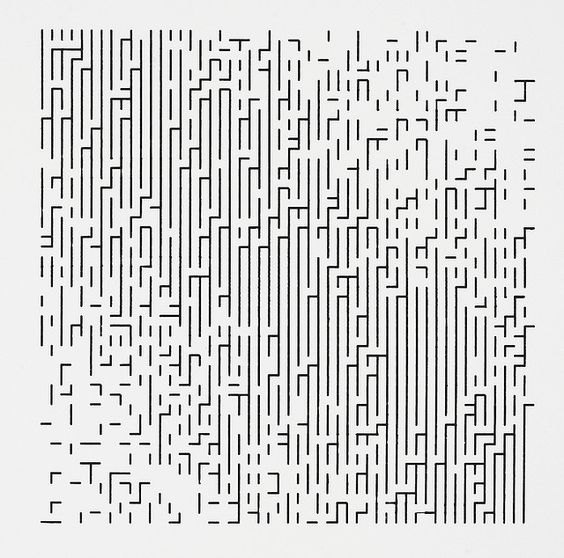
05 · FRIEDER NAKE · WALK-THROUGH-RASTER · 1966
Week 1 showed you this and asked whether a program can make art. Here is the program. Twenty-five lines. You are going to read them.
05 · READING
Read it out loud
Reading code takes practice.
Start at the bottom: what does it print?
Then the loops, the lines that repeat: what is w, what is h, which changes faster?
Only then the two conditions, the yes/no tests.
Say the types as you go: "a list of columns; each column a list; each cell a pair of yes/no values."
for w in range(size):        # columns
    for h in range(size):    # rows, top down
        bar = (random.randint(0, size - 2)
               >= abs(w - h))
        cap = (random.randint(0, size)
               > 0.2 * size
               and last_square_empty)
        grid[w].append((bar, cap))
        last_square_empty = not (bar or cap)
QUESTION · Multiple choice
Where will the picture be dense?
A
Along the top row
B
Along the diagonal
C
Everywhere the same
D
Along the left edge
05 · READ IT
Run the rule
The first half decides; the second half draws, by printing an SVG. M w h v1 is “go to the cell, draw down one”; h1 draws across.
Press Run and compare with your prediction. Run it again: what changes, and what never does?
QUESTION · Short answer
Which combination never occurs?
Two marks that are never found together, and the line that forbids it.
e.g. "a ___ directly ___ a ___ — because line __ says ___"
05 · THE LINE THAT FORBIDS IT
A cap never sits under a drawn cell
cap = (... and last_square_empty)
last_square_empty was set by the previous h in the same w — the cell above. So a cap is only drawn under an empty cell, and the picture can be checked: find a cap under a bar and the code is wrong.
That is a specification. A sentence about the output that is either true or false. To keep it true, the program has to remember one thing from the cell before — that is what last_square_empty is for.
05 · FIND THE FAULT
Half the picture is solid
One character is missing from this copy. Run it: one half is solid bars.
Find the line, and say why that side.
05 · MEET THE SPEC
Does this still meet the spec?
Someone tidied the code: last_square_empty is now set right after the bar is decided. It runs, and the picture looks about right.
The spec: a cap never sits under a drawn cell. Run it — the check reads the grid. Then fix it.
05 · THE RULE, DRAWN
Same rule, lines instead of characters
Twenty-five lines print it. Twenty-five different lines draw it: the rule does not care what a bar is made of.
Mouse left to right: how often a cap is allowed
Click: a new roll of the dice
Week 3 you write the drawing version yourself, with data instead of dice.
06
Four things that will surprise you
The parts that bite
06 · SURPRISE 01 · NUMBERS
What is the output of 0.1 + 0.1 + 0.1 == 0.3 ?
A
True
B
False
06 · SURPRISES
The four that actually bite
01 · NUMBERS
Decimals are not exact
To a computer 0.1+0.1+0.1 is not 0.3. Ask “close enough?”, never “equal?”, when numbers have a decimal point.
02 · TWO NAMES
One list, two names
b = a does not copy a list. Both names point at the same list: change one, the other changes. Numbers and text are copied; lists and dicts are shared.
03 · EMPTY
Empty counts as no
An empty list [], empty text "", 0 and None all count as False in an if. Handy, and a trap.
04 · INDENTATION
The shape is the logic
The spaces at the start of a line say what belongs inside a loop or a function. Four of them. And a function with no return gives back None — nothing.
06 · DRILL 01 · NUMBERS
Make the comparison true
The computer stores 0.1 slightly wrong, so three of them add up to 0.30000000000000004.
Instead of “is it equal?”, ask “is the difference tiny?”
06 · DRILL 02 · TWO NAMES
Make b a real copy
b = a does not copy the list. It gives the same list a second name, so adding to b also changes a.
Make a print unchanged.
06 · DRILL 03 · RETURN
It gives you None
Python does not return the last statement. A function with no return hands back None, silently.
07
uv
One command, every dependency
07 · UV
Why your code runs and theirs does not
Your script needs Python, and every library it imports — code other people wrote, like pygame. None of that is in the file. It is on your machine.
So it runs for you and breaks for the next person — a groupmate, a marker, you on a lab PC next week. The code is fine. What it needs was never written down.
uv run script.py — runs it, fetching what it needs first
A # /// script block at the top of the file — where a script says what it needs
uv add pandas — records a library for a whole project, so the next person gets it too
07 · UV
A repo that does not say what it needs
is not finished.
08
Workshop
Predict, break, fix
08 · WORKSHOP
The tutorial is in the repo
Everything for the next two hours is one folder in the course repo, and the walkthrough is its README:
github.com/sd5913/pfad · week02/README.md
git pull in your copy of the course repo brings it down; uv run schotter.py is the first thing it asks for.
No clone, or a lab machine you have not used? Download and double-click setup.bat — it installs the tools, clones the repo, fetches a Python and opens VS Code in the folder.
The drills you just did are the short version. The README is the long one, on your machine, with real windows.
08 · WORKSHOP
Two hours
0:00
uv run, and nothing else
git pull in your clone of github.com/sd5913/pfad, then uv run schotter.py
0:10
Your assignment repo
The four git words, the check, then check.yml into the repo so GitHub gives you the tick. URL on Canvas before you leave.
0:55
Read first, run second
Schotter, Nake and a Schotter of cubes — in pygame, on your machine. Predict, run, change one knob.
1:15
Tides
A tidal forecast for Hong Kong waters, drawn as rings. Somebody else's data, your rule.
1:30
Find the fault
Four programs that run and are wrong. One of them is Nake.
1:45
Meet the spec
Four sentences about a picture, three candidates side by side. Exactly one passes — say which.
08 · WORKSHOP
Name it properly while you are here
Assignment 2 is set next week and it lives in a repo with your name on it. The name is the first thing anyone sees.
Bad: assignment2 · ass2 · asdgjfjdj
Good: tidal-spiral · rainmaps-sz
Short, lowercase, easy to type, and it says what the thing does. This repo is in your portfolio for longer than it is in my gradebook.
QUESTION · Image upload
Push, then screenshot the Actions tab.
Tick, cross, or the list — whatever GitHub shows. The URL goes on Canvas.
See you next week
Week 3: getting data, and making it look like something. Assignment 2 is set.
a·t4x
SD5913 · WEEK 02
You will be handed code you did not write.
SD5913 · WEEK 02
01 Assignment 1: two files, and until Sunday
02 Design the mark — week 1 ran out of time
03 Reading, not writing
04 Six types, on your laptop
05 Reading a rule: Nake, 1966
06 Four things that will surprise you
07 uv: one command, every dependency
08 Workshop — predict, break, fix
SD5913 · WEEK 02 · WORDS
Every word from the slides, in plain language: sd5913.github.io/teaching/glossary.html — ask if one is missing.
01
ONE ADDRESS, TWO FILES, UNTIL SUNDAY
01 · ONE ADDRESS
The slides, the course repo, the GitHub organisation and the lab setup are all at the bottom of that page — no sign-in needed. Bookmark it. It is the one address to remember.
01 · ASSIGNMENT 1
README.md is the essay. 500–1000 words, headings, links that work, a References heading at the bottom with APA entries.
PROCESS.md is how you used AI: the tools, one thing kept and why, one thing rejected and why. “I used none” is a fine PROCESS.md, in one sentence.
Public, on the account you registered, with a history that shows the essay was written: several commits (saved versions), on more than one day, each with a message that says what changed.
why-are-we-here/ ├── README.md the essay └── PROCESS.md how you used AI $ git log --oneline e4f1c0a Add references b72d9e1 Cut 200 words from the middle 9c0a5d2 Second draft: one example 51ab3f8 First draft 0d3e7aa Initial commit
01 · THE FIRST 25
Of the first 25 repos on Canvas: 14 are essays, 4 are essays missing one thing, and 7 are not the assignment — the Schotter repo from the tutorial, an empty README, or the week 1 folder copied in, .DS_Store included.
Initial commit, or ten commits in twenty minutesPROCESS.md that is empty, in a subfolder, or says ?[ write your example here ] prompts still in itPROCESS.md that names the paragraph it threw away, and why01 · UNTIL SUNDAY
Deadline Sunday 13 September, 23:59. Nothing is marked before then, and the URL on Canvas keeps working — push to the same repo and it is fixed.
PROCESS.md? Add it — in the main folder, not a subfolder, with that exact name.01 · FOUR WORDS
STATUS
What changed?
git status
VS Code: the Changes list in the Source Control panel (Ctrl+Shift+G).
Costs nothing. Run it until you can predict what it says.
ADD
Take the changes
git add .
VS Code: the + next to a file. It moves to Staged Changes.
Nothing is saved yet. This is choosing what goes in.
COMMIT
Save a snapshot, with a note
git commit -m "Cut the intro"
VS Code: type the message, press Commit.
Still only on your computer. GitHub has not seen it.
PUSH · PULL
Send it up, bring it down
git pull then git push
VS Code: Sync Changes does both, in that order.
Pull takes what GitHub has; push sends what you have. Edited on the website? Pull first, or the push is rejected.
01 · CHECK IT
A spec is a list of what the thing must do. This program reads your repo and says whether it meets the spec. Run it inside your assignment repo.
It checks what a program can check — two files, the word count, a References heading, a PROCESS.md that says something, commits on more than one day. Whether the essay is good is still a person's call.
Copy assignments/check.yml into your repo as .github/workflows/check.yml and GitHub runs it on every push: a green tick, or a red cross.
$ uv run https://raw.githubusercontent.com/
sd5913/pfad/2026/assignments/check.py
Assignment 1 — why-are-we-here
ok README.md: 820 words
FAIL README.md has no References heading
FAIL PROCESS.md is empty
ok 12 commits over 3 days
ok just the files that belong
2 thing(s) to fix. Push again when you have.
01 · WHO CHECKS THE CHECKER
THE LOOP
A rule about itself
The check fails on any file that does not belong. The workflow that runs the check is a file in your repo.
So check.py needs one line that says .github/ is allowed. A rule the checker needs only because the checker exists.
THE CATCH
It cannot check that rule
Could it read check.yml and confirm it calls the real check? Whoever wrote that file could write one that prints ok and stops.
The tick would be green. From inside the repo, nothing can tell the difference.
1931 · 1984
Gödel, then Thompson
Gödel: a system rich enough to describe itself cannot prove its own consistency from inside.
Ken Thompson, Reflections on Trusting Trust: you cannot trust code you did not write yourself, because the tool that built it could lie.
SO
Verification needs an outside
The tutors run the check from outside your repo. The tick is evidence, not proof.
Same for every generated program this semester: a passing test says the code matched the test. Who checked the test?
QUESTION · SHORT ANSWER · YOUR ANSWERS
One line. Git, the terminal, VS Code, the registry — anything.
02
EIGHT MINUTES, NO SOFTWARE
DESIGN THE MARK · 1 — ALONE
This course needs a mark — a logo, the thing on the repo and at the top of the slides. You are the client.
Silent. Pen and paper. A thing you could point at: an object, a shape, a tool. Not an adjective — you cannot draw “innovative”.
e.g. a cursor that is also a pencil · a grid coming apart at one corner · two square brackets facing each other
DESIGN THE MARK · 2 — IN PAIRS
Turn to your neighbour. Read each other your object. Leave with one object — not two, not a mix of two.
Keep one, or build a third thing from both. You may not keep both.
Whoever's object gets dropped says in one line what was good about it. Write that down too.
DESIGN THE MARK · 4 — TWO PAIRS
Join the pair behind you. Four people, one object. It must work at 16 pixels wide — the tiny icon in a browser tab, the picture next to your name on GitHub.
At 16 px you get one shape and one idea. Detail disappears. Decide what survives: “ours is a ___, and at 16px you can still tell, because ___.”
Then one more line: the one thing it must never look like.
Now all of it in one line of 50 characters or fewer. That line is the brief.
DESIGN THE MARK · CAPTURE · 2 MIN · IMAGE UPLOAD · YOUR ANSWERS
Caption, 50 characters or fewer: OBJECT · what survives at 16px · never ___
e.g. “grid, one tile falling out · gap · never a gear” (47 characters)
DESIGN THE MARK · WHAT JUST HAPPENED
Eight minutes, no software. The room now agrees on an object, what survives at 16 pixels, and one thing it must never be. Everything after this — drawing, variations, file formats — is craft.
A machine can draw it. It cannot decide it.
03
THE SHIFT
03 · THE SHIFT
03 · THE SHIFT
Every exercise this week is one of these, and so is every quiz question:
None of them ask you to write a program from a blank file. That comes later, and by then you will be able to tell whether what you wrote is right.
03 · YOUR LAPTOP
Everything from here has a box you can type in. The Python runs in your browser — nothing to install, nothing to hand in.
Run, or ctrl+enter.` key (top left, under Esc) opens a console — a box for one line of Python at a time.Your answers are saved in the browser, so a reload does not lose them.
04
EVERYTHING YOU WILL BE HANDED IS ONE OF THESE
04 · TYPES
3 int a whole number 3.14 float a number with a decimal point "3" str text. The quotes are what make it text True bool yes or no [3, 1, 4] list several things, in order {"n": 3} dict values you look up by name
You will meet tuple and set later. These six carry the whole course.
04 · ONE-LINER 01
Press Run. That is the whole exercise.
The first run downloads Python into your browser, so give it a few seconds. After that it is instant.
04 · ONE-LINER 02
type(x) tells you what kind of thing x is. You will use it all semester to check what an AI assistant actually handed you.
Predict the three lines, then add a fourth for an empty list.
04 · ONE-LINER 03
+ means add for numbers and join for text. Same symbol, two jobs, and Python picks by type — not by what you meant.
Make it print 12 rather than 66.
04 · ONE-LINER 04
Square brackets ask a str, a list and a dict the same question: give me the one at ___. Positions count from 0; -1 is the last.
Add the two missing lines — the last colour, and the year.
04 · ONE-LINER 05
An f before the quotes lets you drop a value into the text with {}. This is how every label, caption and error message you write gets made.
Make it print Ada is 36.
04 · TYPES
Five lines, five minutes, and you can now read most of what you will be handed.
What is left is not more syntax. It is noticing when the type is not the one you assumed — which is the next hour, and the rest of the semester.
The console is always there: press backtick (`) on any slide and type into it. Every drill has a ›_ button that loads it in.
05
NAKE, 1966 · THE PICTURE IS THE TEST
05 · FRIEDER NAKE · WALK-THROUGH-RASTER · 1966
Week 1 showed you this and asked whether a program can make art. Here is the program. Twenty-five lines. You are going to read them.
05 · READING
Reading code takes practice.
w, what is h, which changes faster?Say the types as you go: "a list of columns; each column a list; each cell a pair of yes/no values."
for w in range(size): # columns for h in range(size): # rows, top down bar = (random.randint(0, size - 2) >= abs(w - h)) cap = (random.randint(0, size) > 0.2 * size and last_square_empty) grid[w].append((bar, cap)) last_square_empty = not (bar or cap)
QUESTION · MULTIPLE CHOICE
A Along the top row
B Along the diagonal
C Everywhere the same
D Along the left edge
ClassPoint · multiple choice — answer on the projector
05 · READ IT
The first half decides; the second half draws, by printing an SVG. M w h v1 is “go to the cell, draw down one”; h1 draws across.
Press Run and compare with your prediction. Run it again: what changes, and what never does?
QUESTION · SHORT ANSWER
Two marks that are never found together, and the line that forbids it.
e.g. "a ___ directly ___ a ___ — because line __ says ___"
ClassPoint · short answer — answer on the projector
05 · THE LINE THAT FORBIDS IT
cap = (... and last_square_empty)
last_square_empty was set by the previous h in the same w — the cell above. So a cap is only drawn under an empty cell, and the picture can be checked: find a cap under a bar and the code is wrong.
That is a specification. A sentence about the output that is either true or false. To keep it true, the program has to remember one thing from the cell before — that is what last_square_empty is for.
05 · FIND THE FAULT
One character is missing from this copy. Run it: one half is solid bars.
Find the line, and say why that side.
05 · MEET THE SPEC
Someone tidied the code: last_square_empty is now set right after the bar is decided. It runs, and the picture looks about right.
The spec: a cap never sits under a drawn cell. Run it — the check reads the grid. Then fix it.
05 · THE RULE, DRAWN
Twenty-five lines print it. Twenty-five different lines draw it: the rule does not care what a bar is made of.
Week 3 you write the drawing version yourself, with data instead of dice.
Open the live sketch › — move the mouse: cap chance · click: reroll
06
THE PARTS THAT BITE
06 · SURPRISE 01 · NUMBERS
A True
B False
ClassPoint · multiple choice — answer on the projector
06 · SURPRISES
01 · NUMBERS
Decimals are not exact
To a computer 0.1+0.1+0.1 is not 0.3. Ask “close enough?”, never “equal?”, when numbers have a decimal point.
02 · TWO NAMES
One list, two names
b = a does not copy a list. Both names point at the same list: change one, the other changes. Numbers and text are copied; lists and dicts are shared.
03 · EMPTY
Empty counts as no
An empty list [], empty text "", 0 and None all count as False in an if. Handy, and a trap.
04 · INDENTATION
The shape is the logic
The spaces at the start of a line say what belongs inside a loop or a function. Four of them. And a function with no return gives back None — nothing.
06 · DRILL 01 · NUMBERS
The computer stores 0.1 slightly wrong, so three of them add up to 0.30000000000000004.
Instead of “is it equal?”, ask “is the difference tiny?”
06 · DRILL 02 · TWO NAMES
b = a does not copy the list. It gives the same list a second name, so adding to b also changes a.
Make a print unchanged.
06 · DRILL 03 · RETURN
Python does not return the last statement. A function with no return hands back None, silently.
07
ONE COMMAND, EVERY DEPENDENCY
07 · UV
Your script needs Python, and every library it imports — code other people wrote, like pygame. None of that is in the file. It is on your machine.
So it runs for you and breaks for the next person — a groupmate, a marker, you on a lab PC next week. The code is fine. What it needs was never written down.
uv run script.py — runs it, fetching what it needs first# /// script block at the top of the file — where a script says what it needsuv add pandas — records a library for a whole project, so the next person gets it too07 · UV
08
PREDICT, BREAK, FIX
08 · WORKSHOP
Everything for the next two hours is one folder in the course repo, and the walkthrough is its README:
git pull in your copy of the course repo brings it down; uv run schotter.py is the first thing it asks for.The drills you just did are the short version. The README is the long one, on your machine, with real windows.
08 · WORKSHOP
0:00 uv run, and nothing else
git pull in your clone of github.com/sd5913/pfad, then uv run schotter.py
0:10 Your assignment repo
The four git words, the check, then check.yml into the repo so GitHub gives you the tick. URL on Canvas before you leave.
0:55 Read first, run second
Schotter, Nake and a Schotter of cubes — in pygame, on your machine. Predict, run, change one knob.
1:15 Tides
A tidal forecast for Hong Kong waters, drawn as rings. Somebody else's data, your rule.
1:30 Find the fault
Four programs that run and are wrong. One of them is Nake.
1:45 Meet the spec
Four sentences about a picture, three candidates side by side. Exactly one passes — say which.
08 · WORKSHOP
Assignment 2 is set next week and it lives in a repo with your name on it. The name is the first thing anyone sees.
assignment2 · ass2 · asdgjfjdjtidal-spiral · rainmaps-szShort, lowercase, easy to type, and it says what the thing does. This repo is in your portfolio for longer than it is in my gradebook.
QUESTION · IMAGE UPLOAD
Tick, cross, or the list — whatever GitHub shows. The URL goes on Canvas.
ClassPoint · image upload — answer on the projector
Week 3: getting data, and making it look like something. Assignment 2 is set.